 XCIPTV Player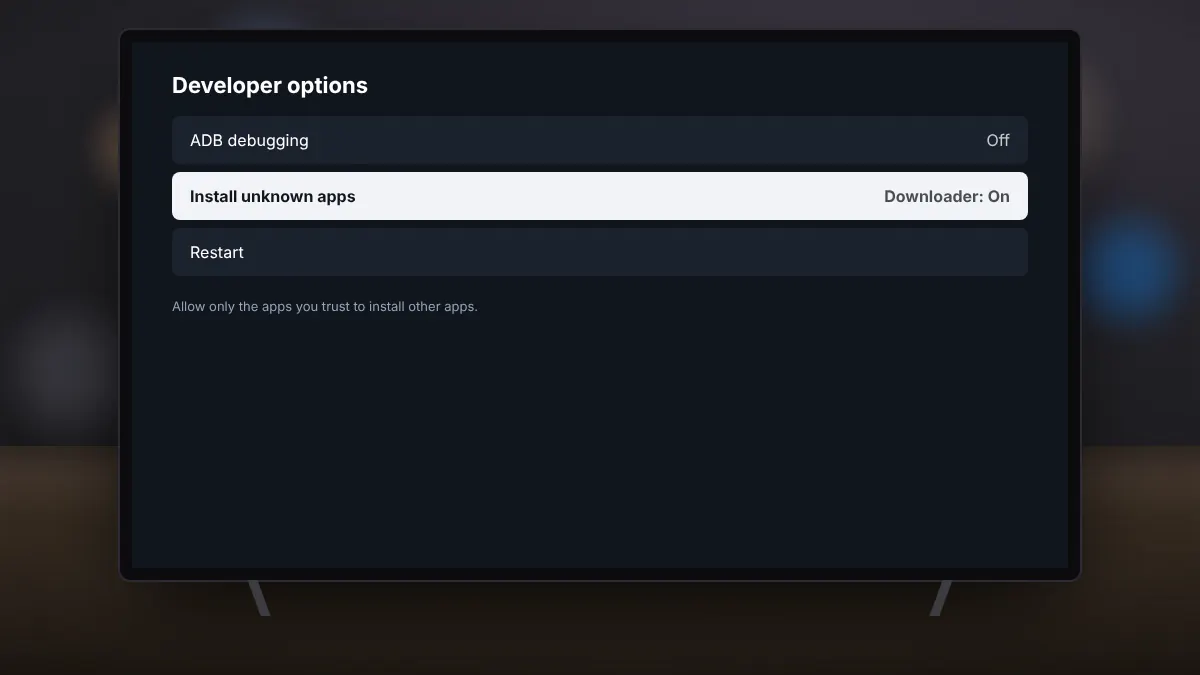
Fire TV devices use Amazon's Appstore rather than Google Play, so XCIPTV Player has to be installed from its APK file. The process is called sideloading. Done carefully, with the original file, it is safe and takes about five minutes.
Step 1: Install the Downloader app
From the Fire TV home screen, search for Downloader and install it from the Amazon Appstore. It is a free app that lets you fetch files by web address.
Step 2: Allow apps from unknown sources
- Open Settings, then My Fire TV.
- If you do not see Developer options, open About and select the device name seven times to unlock them.
- Go to Developer options, then Install unknown apps, and switch it on for Downloader only.
Step 3: Download the original APK
Open Downloader and enter the address of a trusted source that hosts the original, unmodified APK signed by OTTRUN, such as APKMirror. Choose the latest release for Android TV or the universal version, and let Downloader save and open the file.
Step 4: Install and open
Select Install when prompted. When it finishes, choose Open, or find XCIPTV Player later under Your Apps & Channels. You can move it to the front of the row for quick access.
Step 5: Tidy up
- Delete the APK file in Downloader to free storage.
- Switch Install unknown apps back off for Downloader.
Updating on Fire TV
Sideloaded apps do not update automatically. When a new version is released, repeat steps 3 and 4. Your login and favourites are usually kept, but making a backup in the app first is a good habit.